Cordially Wed for iPhone: How the Wedding Guest Texting App Works
A walkthrough of the Cordially Wed iPhone app for couples: sign in with a 6-digit code, track RSVPs, edit guests and events, and answer every SMS and WhatsApp reply. Guests never need an app.
By Mia ·
Cordially Wed for iPhone is the couples' side of Cordially Wed. It shows your RSVPs, lets you edit guests and events, and puts every guest reply in one inbox with a notification for each one.
It is the same wedding as cordiallywed.com. Sign in with your email and anything you change on the phone shows up on the web, and the other way round.
The app is free on the App Store for iPhone with iOS 17 or later.
Do guests need to download an app?
No. The app is only for the two of you.
- Guests get your messages as a normal SMS or WhatsApp message, from a Cordially sending number.
- They RSVP from a link that opens in their browser. No account, no password.
- On iPhone, your Guest Companion link opens as an App Clip, a small Apple preview that needs no install.
- Adding the Apple or Google Wallet pass is optional.
How do you sign in?
- Download Cordially Wed from the App Store.
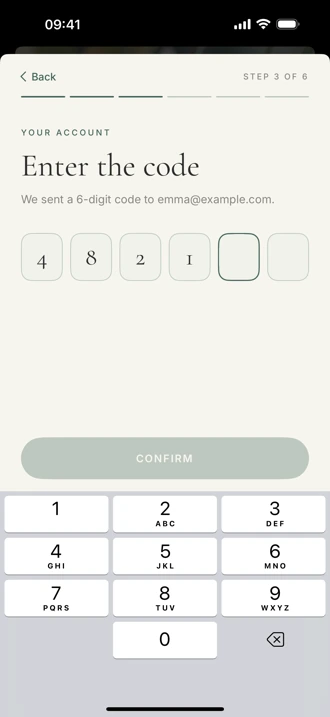
- Tap Log in and enter the email you used on cordiallywed.com.
- Type the 6-digit code from your inbox. There are no passwords.
New to Cordially? Tap Create my wedding. You add your names, your email, the wedding date and your phone number, the same steps as signing up on the web.
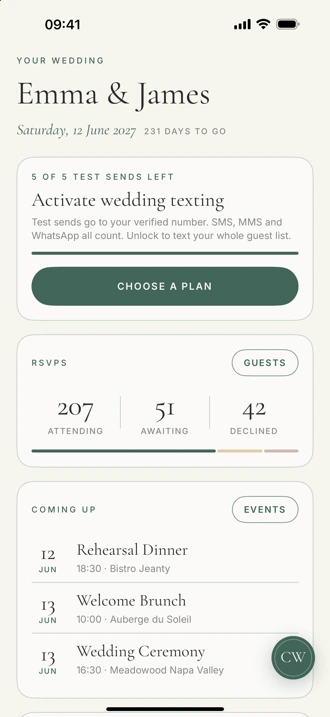
Home: RSVPs and what's next
The home screen answers the questions you get asked most:
- How many guests are attending, still awaiting, or declined
- Which events are coming up, with time and venue
- Which guests replied since you last looked
The round CW button in the corner opens everything else: Guests, Events, Inbox, Guest Companion and Account.
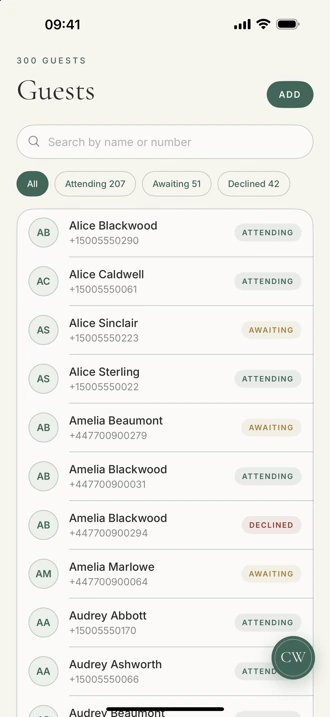
Guests: add, edit and mark RSVPs
Search your guest list by name or number, or filter to Attending, Awaiting or Declined.
- Add a guest with a name and mobile number.
- Open a guest to change their RSVP, email, dietary needs, table or notes.
- Mark an RSVP yourself when a guest tells you in person.
Importing a full list from a spreadsheet, Zola or The Knot happens on the web. Once it is in, the whole list is on your phone.
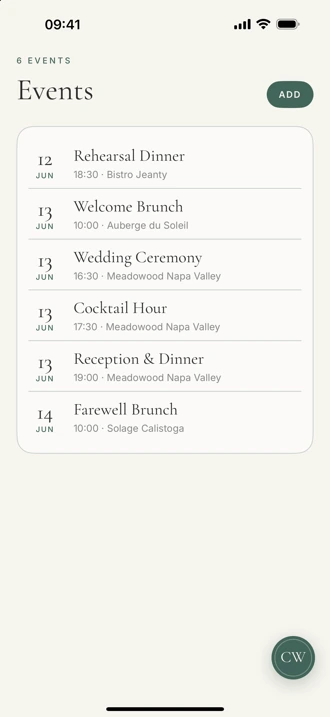
Events: your wedding weekend
Add each event with its name, day, start time, venue and address: the rehearsal dinner, the ceremony, the reception, the brunch.
These are the same events guests see on their RSVP page and in your Guest Companion, so a time you fix on your phone is fixed for everyone.
Inbox: answer guests from anywhere
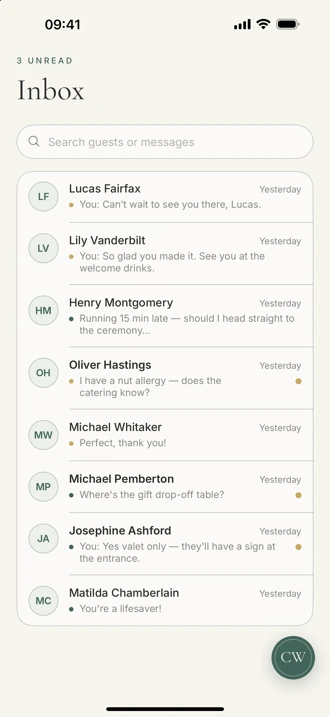
Every SMS and WhatsApp reply lands in one inbox, one thread per guest, marked SMS or WhatsApp.
- Reply and it goes back on the same channel, from the Cordially sending number, never your personal phone.
- Search by guest or by message.
- WhatsApp only allows free replies within 24 hours of the guest's last message. After that, send an approved template from the web.
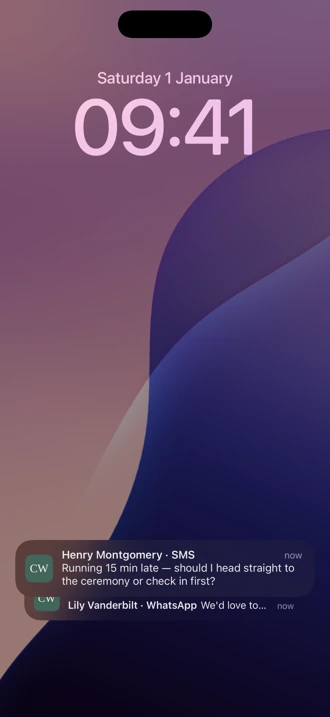
Reply notifications
Allow notifications once and each guest reply arrives on your lock screen with the guest's name and channel, like "Henry Montgomery · SMS". Tap it to open that conversation and answer.
Notifications cover SMS and WhatsApp replies. Turn them off any time in iPhone Settings.
Guest Companion: what guests open
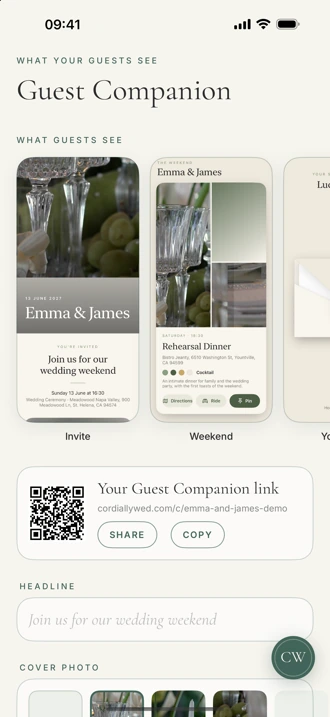
Guest Companion is the page guests open from your link: the invitation, the weekend's events and their table.
- Change the headline, cover photo and color (Sage, Blush, Midnight or Gold).
- Turn the weekend lookbook and the table reveal on or off, and hide events.
- Share the link or the QR code from the app.
On iPhone it opens as an App Clip with no download. On other phones it opens your wedding website.
Texting your whole guest list
Before you pay, you can send 5 free test messages to your own verified number. The home screen shows how many are left.
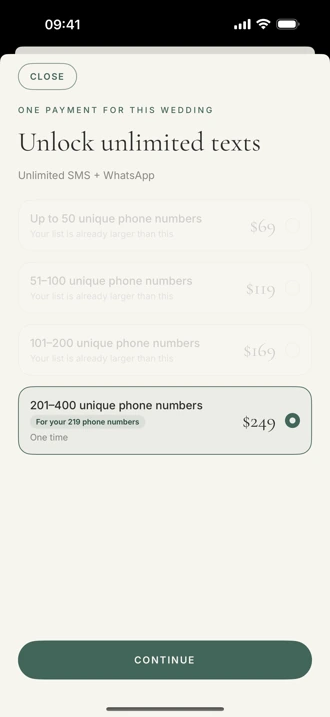
To text every guest, pick a texting plan in the app. Plans are sized by unique guest phone numbers: $69 up to 50, $119 up to 100, $169 up to 200 and $249 up to 400. It is a one-time payment, with unlimited messages and no subscription. Checkout opens in Safari.
What you still do on the web
The iPhone app is for keeping up. A few setup jobs are easier on a bigger screen at cordiallywed.com:
- Importing your guest list from a spreadsheet, Zola or The Knot
- Writing and scheduling messages to all guests or a group
- Building your wedding website and seating chart
Everything you do there shows up in the app.
Frequently asked questions
Is the Cordially Wed app free?
Yes. The app is free to download, and the guest list, RSVPs, events and wedding website are free. Texting guests is a one-time payment sized by unique guest phone numbers, from $69, with unlimited messages.
Do my wedding guests need to download the app?
No. Guests get your messages by SMS or WhatsApp and RSVP from a link in their browser. The app is only for the couple.
Is there an Android app?
Not yet. On Android, use cordiallywed.com in your phone's browser. It is the same account and the same inbox.
Can I use the app with the wedding I already set up on the web?
Yes. Sign in with the same email and you see the same guests, events, RSVPs and inbox.
Can I send a message to all my guests from the app?
Not yet. Write and schedule messages to all guests or a group on cordiallywed.com. The app is for replies, RSVPs, guests and events.
Which iPhones does the app work on?
Any iPhone with iOS 17 or later.